Chromebook Plus 515 2023 Review: Real User Experience After 3 Months
Introduction: Why I Chose the Chromebook Plus 515
I have spent the last decade jumping between high-end Windows ultrabooks and expensive MacBooks, always chasing the promise of a "perfect" mobile workstation. However, three months ago, I found myself in a position where I needed a secondary machine specifically for writing, heavy web-based research, and administrative tasks. I didn’t want to spend $1,200 again, but I was tired of the "budget" laptop experience where the screen is washed out and the processor chokes on more than five Chrome tabs. When Google announced the "Chromebook Plus" standard in late 2023, the Acer Chromebook Plus 515 (CB515-2H) caught my eye. It promised double the performance, double the memory, and a much better display than the entry-level devices I usually avoided. I decided to put my own money down and see if a $400-range machine could actually handle my daily 10-hour workload. After 90 days of using it as my primary device, my perspective on what makes a "good" laptop has shifted significantly.
The First Impression: Substantial but Not Premium
When I first pulled the Chromebook Plus 515 out of the box, I was struck by its size. This is a 15.6-inch laptop, which is a departure from the 13-inch "portability first" devices I’ve used lately. What I immediately noticed was the build material. It is undeniably plastic. However, Acer has used a textured finish that feels robust rather than flimsy. There is a slight flex if I press hard on the center of the keyboard, but during actual typing, I haven't found it to be a distraction. One thing that bothered me initially was the weight. At nearly 4 pounds, I felt it in my backpack during my morning commute. But after a week, I realized the trade-off: that extra surface area meant I got a full-sized keyboard and a numeric keypad, which has been a lifesaver for my spreadsheet work.
Daily Performance: The Core i3 Surprise
The unit I’ve been using features the Intel Core i3-1215U processor and 8GB of LPDDR5X RAM. In the Windows world, an i3 often feels like a compromise. In the ChromeOS world, especially with the "Plus" optimization, I found it to be surprisingly snappy. What I found was that I could have two different browser windows open—each with about 15 to 20 tabs—while running a Spotify stream and a Slack instance in the background without the interface stuttering. This is where the 8GB of RAM really shines. On older 4GB Chromebooks, I used to see constant tab refreshing, which drove me crazy. After testing for three months, I can count on one hand the number of times I’ve seen a "He's Dead, Jim!" memory error.
I also spent a significant amount of time testing the new AI features Google hyped up for the Plus series. I was surprised by how much I actually used the built-in Magic Eraser in the Google Photos app. I’m not a professional photo editor, but for cleaning up quick shots for my personal blog, being able to circle a distracting trash can in the background and have it disappear in seconds—locally on the hardware—felt like magic. I also noticed that the offline file sync works much more reliably here than on my previous Chromebooks, likely due to the 128GB of UFS storage which is significantly faster than the old eMMC chips.
The Screen: A Mixed Bag for My Eyes
I have a love-hate relationship with the display on the 515. It’s a 1920x1080 IPS panel with a matte finish. I appreciated the matte coating immediately because my home office has a large window right behind my desk; the lack of glare made it much easier to work during the afternoon sun. However, one thing that disappointed me was the peak brightness. It’s rated at around 250 nits. While that’s fine for a dim cafe or a typical office, I tried working on my patio last week and found it almost impossible to see the text clearly. Furthermore, while the colors are accurate enough for YouTube and document editing, I noticed that the saturation feels a bit thin compared to my OLED phone. It’s a professional-looking screen, but it’s not an "inspiring" one.
Keyboard, Touchpad, and the NumPad Factor
As someone who writes roughly 3,000 to 5,000 words a day, the keyboard is the make-or-break feature for me. In my experience, Acer generally does a good job with key travel, and the 515 is no exception. The keys have a slightly "mushy" bottom-out compared to a mechanical keyboard, but they are quiet and reliable. One thing I had to get used to was the offset nature of the keyboard. Because of the dedicated numeric keypad on the right, the main QWERTY keys are shifted slightly to the left. For the first two days, I kept hitting the 'Caps Lock' (the Search key in ChromeOS) when I meant to hit 'A'. Once my muscle memory adapted, however, I found the inclusion of the NumPad to be a net positive. The touchpad is large and made of a moisture-resistant material Acer calls "OceanGlass." While it’s technically a plastic composite, it feels remarkably like glass. I’ve never had it skip or misinterpret a gesture, which is more than I can say for some Windows laptops at twice this price.
Shop the latest Electronics picks on Amazon.
Shop Amazon →Battery Life: Expectation vs. Reality
Google claims "up to 10 hours" of battery life for these Plus machines. In my real-world testing, I found that number to be a bit optimistic. I typically keep my brightness at about 70% and have a constant stream of web activity. Under these conditions, I’ve been consistently getting between 7.5 and 8.5 hours. It’s enough to get through a full workday if I’m careful, but I still find myself reaching for the charger around 4:30 PM. I was disappointed that it didn't quite hit that legendary 10-12 hour mark I've seen on some ARM-based Chromebooks, but the tradeoff for the Intel performance is probably worth it for most users.
Comparison: Chromebook Plus 515 vs. Standard Chromebooks
To give you a better idea of where this sits in the market, I've put together a table comparing my experience with this "Plus" model versus the standard 15-inch Chromebook I used last year.
| Feature | Standard Chromebook (2022) | Chromebook Plus 515 (2023) |
|---|---|---|
| Processor | Intel Celeron/Pentium (N-Series) | Intel Core i3-1215U (12th Gen) |
| RAM | 4GB LPDDR4 | 8GB LPDDR5X |
| Storage Tech | eMMC (Slow) | UFS (Fast) |
| Webcam | 720p (Grainy) | 1080p (Temporal Noise Reduction) |
| Display | TN Panel (Poor viewing angles) | IPS Panel (Great viewing angles) |
The Webcam and Audio Experience
One specific area where I noticed a massive improvement was the webcam. Most Chromebooks I've used have 720p cameras that make me look like a blurry mess during Zoom calls. The 1080p camera on the 515 is genuinely good. It has built-in AI tools that allow you to blur the background or improve lighting regardless of which app you are using (be it Google Meet, Teams, or Webex). I was surprised by how well the background noise cancellation worked; I sat in a busy coffee shop for a client call, and they told me they could barely hear the espresso machine in the background. The speakers are upward-facing, located on either side of the keyboard. They get loud enough for a movie in a quiet room, but like most laptops in this category, the bass is almost non-existent. I found them perfectly adequate for podcasts and video calls, but I still reach for my headphones for any serious music listening.
Everything I Liked and Disliked
After three months of daily use, here is my honest breakdown of the pros and cons of the Chromebook Plus 515.
Pros
- The performance is noticeably better than non-Plus models; multitasking feels fluid and "Windows-like" in speed.
- Having a 1080p webcam at this price point is a game-changer for remote workers and students.
- The 15.6-inch screen size provides enough real estate to have two documents open side-by-side without squinting.
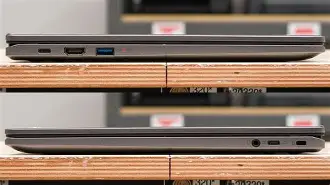
- Ports are plentiful: you get two USB-C ports (both can charge), a USB-A port, and a full-sized HDMI port which I use daily to connect to my external monitor.
- The keyboard feels sturdy and the inclusion of a numeric keypad is excellent for data entry.
Cons
- The screen brightness is underwhelming; don't plan on doing much work in direct sunlight or bright outdoor environments.
- The chassis is entirely plastic and feels a bit bulky compared to modern 14-inch alternatives.
- Battery life is good but doesn't quite reach the all-day 10-hour promise under medium-to-heavy workloads.
- The cooling fan does kick in during heavy multitasking; it's not loud, but I noticed the whirr in a completely silent room.
- The downward-sloping front edge of the palm rest can sometimes feel a bit sharp against my wrists during long typing sessions.
Buying Guide: Is This Version Right for You?
I think it’s important to understand who this machine is for. In my experience, there are three types of people who will find the Chromebook Plus 515 to be a perfect fit. First, there are the "Table-Top" users. If you aren't planning on sitting in the park with your laptop, the 15.6-inch size and 250-nit screen won't be an issue for you. It’s a great "kitchen counter" or "desk" machine. Second, students who need to write long papers and handle multiple research tabs will appreciate the 8GB of RAM. The days of a Chromebook crashing because you have too many tabs for a bibliography are over with this model. Finally, there are the remote workers who primarily use Google Workspace. If your life is in Docs, Sheets, and Slides, the 12th Gen Intel processor makes these apps feel as fast as they do on a $1,000 MacBook.
However, I would caution those who are looking for a "multimedia first" device. If your primary use case is watching HDR movies or doing professional-level photo and video editing, the screen's color gamut will likely leave you wanting more. Also, if you are a "digital nomad" who works from trains, planes, and tiny cafe tables, you might find the footprint of this 15-inch device to be a bit cumbersome. In those cases, I’d suggest looking at the 14-inch Chromebook Plus alternatives which offer similar internals in a smaller frame.
Discover deals on Electronics — updated daily.
See Deals →The Software Longevity Aspect
One thing I always look for when buying electronics is the "expiration date." Google has committed to 10 years of automatic software updates for these newer Chromebooks. This means my 515 should be receiving security patches and feature updates until 2033. When I factor the price I paid against a decade of use, the value proposition is incredible. I've already seen two major ChromeOS updates since I started using it, and both added small but meaningful features, like better integration with my Android phone's notification center and more refined Material You styling across the interface.
I also want to mention the Linux support. I’m a bit of a tinkerer, and I found that enabling the Linux environment was seamless. I was able to install a few desktop-grade apps, including a lightweight code editor and a different browser for testing purposes. The i3 processor handled these "heavier" applications much better than the ARM-based Chromebooks I’ve tested in the past. It adds a layer of versatility that ensures I won't outgrow the machine in a year.
Conclusion: Three Months Later
After ninety days of real-world use, my verdict on the Chromebook Plus 515 is that it represents the "sweet spot" of the current laptop market. It isn't trying to be a luxury item. It doesn't have a magnesium alloy frame, a 4K screen, or a flashy brand name. What it does have is a set of specifications that finally match the demands of the modern web. I no longer feel like I am "settling" for a slower experience just because I am using a Chromebook. What I found was a reliable, fast, and highly functional tool that does exactly what I ask of it every morning.
The transition from a high-end Windows machine to this was much smoother than I anticipated. I missed the premium materials for about a week, but once I started actually working, the speed of the 12th Gen Intel chip and the comfort of the large keyboard became the things I valued most. If you can live with a display that is merely "good" and a chassis that is "functional plastic," I found that the performance-to-price ratio here is nearly impossible to beat. It has earned a permanent place in my workflow, and I don't see myself going back to a $1,200 machine for my daily writing any time soon. The Chromebook Plus 515 is a testament to the idea that you don't need to spend a fortune to get a device that respects your time and your productivity.